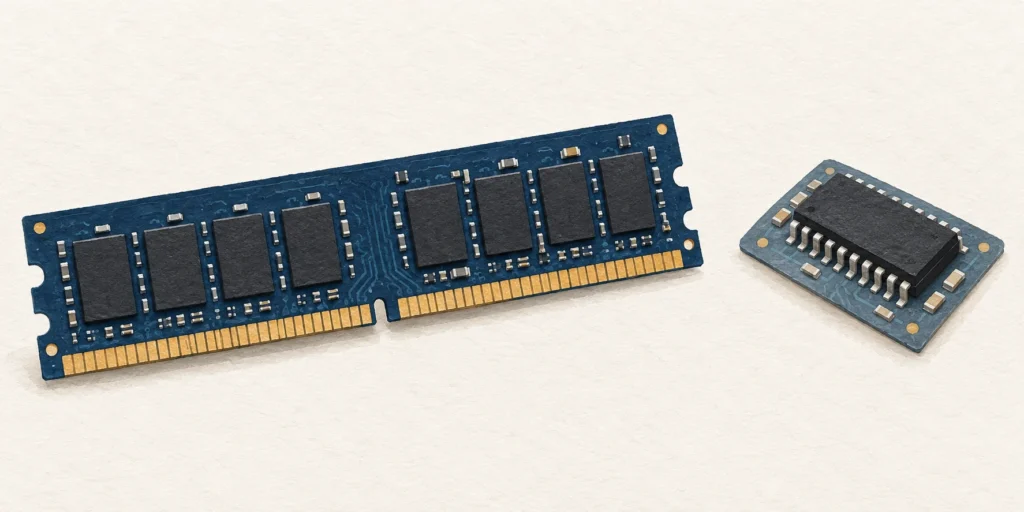
RAM is a computer’s writable working memory, usually losing its contents without power. ROM-family memory retains firmware or other data; some types can be deliberately reprogrammed.
RAM is the writable working memory used for data and applications currently in use. Ordinary main-memory RAM is volatile: its contents are lost without power. ROM, or read-only memory, belongs to a non-volatile family associated with retained instructions and data, such as firmware. Some ROM-family types can be deliberately reprogrammed. [1][2][4]
Depends on type: some can be programmed or erased electrically [2][4]
Typical specification question
How much working memory is available?
Which retained instructions or firmware does the device use? [2][4]
RAM is a working area, not the saved-file store
RAM stands for random-access memory. A practical way to recognise its role is to ask what the processor is working on now: open applications and their active data need a temporary working area. A phone, for example, distinguishes this RAM from the flash storage holding pictures, videos and its operating system. [4]
In conventional computers, main memory commonly uses DRAM. Losing power removes its working contents. That is why “non-volatile” and “volatile” matter more here than whether two chips happen to look alike. This comparison concerns ordinary main-memory RAM; the letters RAM are not a promise that every specialised technology bearing that name has identical properties. [1][3]
Why ROM can still be updated
The expanded name “read-only memory” can make the family sound permanently unchangeable. Its variants need more care: PROM can be programmed once; EPROM can be erased with ultraviolet light; EEPROM can be erased and written electrically. They do not all have the same writing restrictions. [2]
EEPROM retains data without power, while permitting deliberate changes. Non-volatile therefore means retained without power, not “impossible to edit”. The distinction between retaining data and allowing an update resolves the apparent contradiction in programmable read-only memory. [2]
Firmware is low-level software used by the device. Older computer BIOS instructions were held on read-only chips; later systems use flash so the firmware can be rewritten without removing the chip. A firmware update is not the same kind of continuous working-memory activity as editing a document. [3]
Three roles when a document is edited
Firmware memory: retains the low-level instructions the device needs.
RAM: provides the active working area while the document is open.
SSD storage: retains a saved copy of the file.
This is a role diagram, not a timing chart or a claim that every device has the same layout. [1][2][3][4]
A worked power-off example
Imagine a document whose last saved version says “Meeting at 2 pm”. You change the open document to “Meeting at 3 pm”, but it has not been saved or autosaved anywhere. If power is removed from the ordinary working RAM, that unsaved working state cannot be relied on to remain. The saved 2 pm copy is a separate record in storage. [1][4]
The firmware can remain too: it lives in non-volatile memory, rather than needing the unsaved document’s working state. Applications may recover edits from an autosave file or another persistent copy; that recovery does not show that unpowered DRAM kept them. The example explicitly excludes such a saved 3 pm copy. [1][2][3]
Read a laptop specification without adding unlike capacities
Take an invented specification: 16 GB RAM and 512 GB SSD. The 16 GB describes working-memory capacity; 512 GB describes file-storage capacity. It does not mean 528 GB of RAM. Nor should the SSD automatically be called ROM: it is writable non-volatile storage, commonly using NAND flash. [1]
If the question is “where can I keep more saved files?”, examine storage. If the question is “what working memory is available to running applications?”, examine RAM. Neither figure alone is a complete performance test, and these invented capacities are not an upgrade recommendation.
Test three memory statements
A document survives a restart because it was saved on an SSD. Did RAM retain it?
No. The persistent saved copy was in non-volatile storage. Ordinary DRAM does not need to retain the file across power loss for that to happen. [1]
An EEPROM is updated electrically. Does that make it volatile RAM?
No. EEPROM can be reprogrammed while retaining data without power. Writability and volatility are separate properties. [2]
A specification lists 16 GB RAM and 512 GB SSD. Is that 528 GB RAM?
No. They are separate capacities for different roles. The SSD is writable storage, not extra working RAM. [1][4]
Frequently asked questions
Is all flash memory the same as a ROM chip?
No. Flash is used for several purposes, including firmware and writable file storage. Identify the role and device rather than replacing every use of “flash” with “read-only”. [1][3]
Can the illustration identify a chip’s contents?
No. The components are representative artwork. Appearance alone does not verify a chip model, firmware version or stored data.
Sources
Source pages checked on 19 October 2026. The examples and self-checks were written for this article with AI assistance and checked against the listed material.
An HDD stores data on spinning magnetic platters; an SSD uses electronic flash storage. That changes access time and mechanical behaviour, but compatibility and copy speed need separate checks.
A Chromebook is a type of laptop running ChromeOS. The useful comparison is with Windows or macOS laptops, especially the apps, offline tasks and update life you need.
OLED pixels make their own light; conventional QLED TVs use a quantum-dot LCD panel with an LED backlight. QD-OLED and Mini LED explain why the labels need careful reading.