An HDD stores data on spinning magnetic platters; an SSD uses electronic flash storage. That changes access time and mechanical behaviour, but compatibility and copy speed need separate checks.
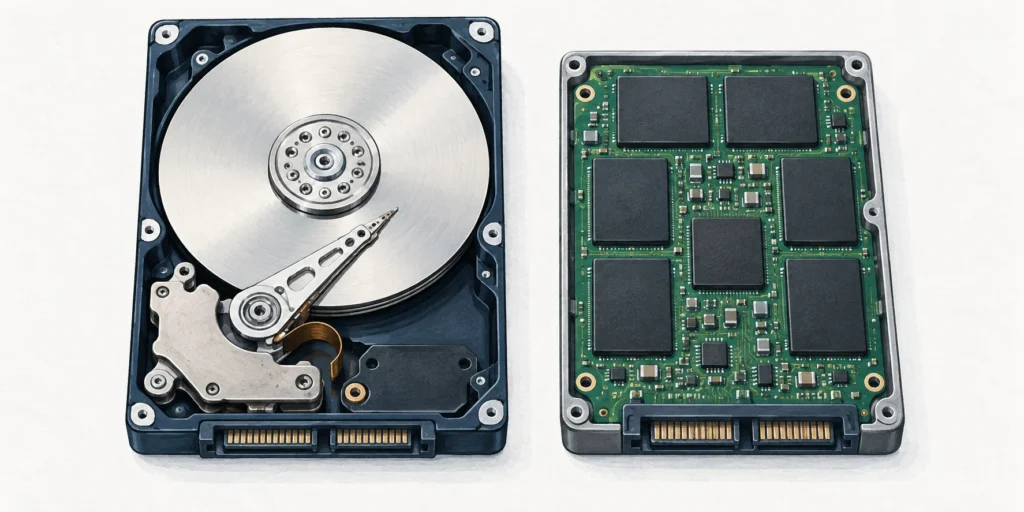
An HDD stores data magnetically on spinning platters, with moving parts that locate the data. An SSD stores data electronically in flash-memory chips, without that mechanical movement. SSDs generally respond faster to storage requests, while HDDs remain useful for large-capacity storage; the exact device and connection still matter. [2][3][4]
Depends on the whole transfer path, not only the drive type. [4]
A fast drive cannot remove a slower source, link or destination. [4]
Why the mechanism changes responsiveness
A spinning drive must position its head to access the required part of a platter. Flash storage avoids that mechanical seek. This matters when a computer requests many different files, not just when it copies one long file in a straight sequence. [2][3]
That does not turn “SSD” into one fixed speed. A SATA SSD and an NVMe SSD are both solid-state storage, but their communication arrangements differ. Advertised sequential transfer figures also describe a different task from lots of small file requests. [3][4]
Do not confuse SSD, SATA, NVMe and M.2
HDD or SSD describes the storage technology. SATA or NVMe describes how storage communicates with the system. M.2 describes a card format and connector arrangement; it is not another word for NVMe. M.2 SATA SSDs exist. [1][3]
For an upgrade, first identify the drive type, size and communication support listed in the computer’s documentation. An M.2-shaped card is not guaranteed to work merely because a slot looks similar: SATA and PCIe/NVMe support must match the system. A conventional 2.5-inch SATA bay and an M.2 slot are different physical arrangements. [1][3]
Keep three storage questions separate
Technology: rotating magnetic HDD or flash-based SSD?
Physical fit: which drive size or card format does the computer accept?
Communication: which SATA or PCIe/NVMe arrangement does that connection support?
Compatibility comes before comparing headline speed. The opened devices in the illustration explain the storage mechanism, not an installation procedure. [1][3]
A worked transfer-time example
Assume a 40 GB file, using decimal units: 40,000 MB. If an entire transfer sustains 100 MB/s, the ideal time is 40,000 ÷ 100 = 400 seconds, or 6 minutes 40 seconds. At an assumed sustained 500 MB/s, it is 40,000 ÷ 500 = 80 seconds, or 1 minute 20 seconds.
Those rates are chosen examples, not measured HDD and SSD results. The second ideal transfer takes one fifth as long because its assumed rate is five times larger. Real copies can take longer: the source drive, destination, connection, cable, file sizes and cache behaviour can all change the sustained rate. [4]
Test the labels
Does an SSD have to be an NVMe drive?
No. SATA SSDs also exist. SSD identifies the storage mechanism, while NVMe identifies a communication protocol. [3]
Does a 500 MB/s headline guarantee our 40 GB copy finishes in 80 seconds?
No. That calculation requires the entire transfer to sustain 500 MB/s continuously, using the stated decimal units and ignoring overhead. A slower source, connection or destination changes the result. [4]
Does M.2 automatically mean NVMe?
No. M.2 is a form factor and connector arrangement, and SATA M.2 cards exist. Confirm the actual protocol support as well as physical fit. [1][3]
Frequently asked questions
Is an SSD the same thing as RAM?
No. The NAND flash used for SSD storage is non-volatile: it retains data without continuous power. Calling both “memory” does not make an SSD a replacement name for the computer’s working RAM. [3]
Sources
Source pages checked on 22 October 2026. The examples and self-checks were written for this article with AI assistance and checked against the listed material.
SATA M.2 Card — Serial ATA International Organization.
A Chromebook is a type of laptop running ChromeOS. The useful comparison is with Windows or macOS laptops, especially the apps, offline tasks and update life you need.
OLED pixels make their own light; conventional QLED TVs use a quantum-dot LCD panel with an LED backlight. QD-OLED and Mini LED explain why the labels need careful reading.
RAM is a computer’s writable working memory, usually losing its contents without power. ROM-family memory retains firmware or other data; some types can be deliberately reprogrammed.